Adapter scope: this page covers only the native
nautilus-interactive-brokerscrate.
Interactive Brokers Adapter
nautilus-interactive-brokers integrates IB Gateway or Trader Workstation with Nautilus market-data and execution contracts. The crate is native Rust and contains data and execution clients, factories, configuration, instrument resolution, protocol mapping, and runnable LiveNode examples.
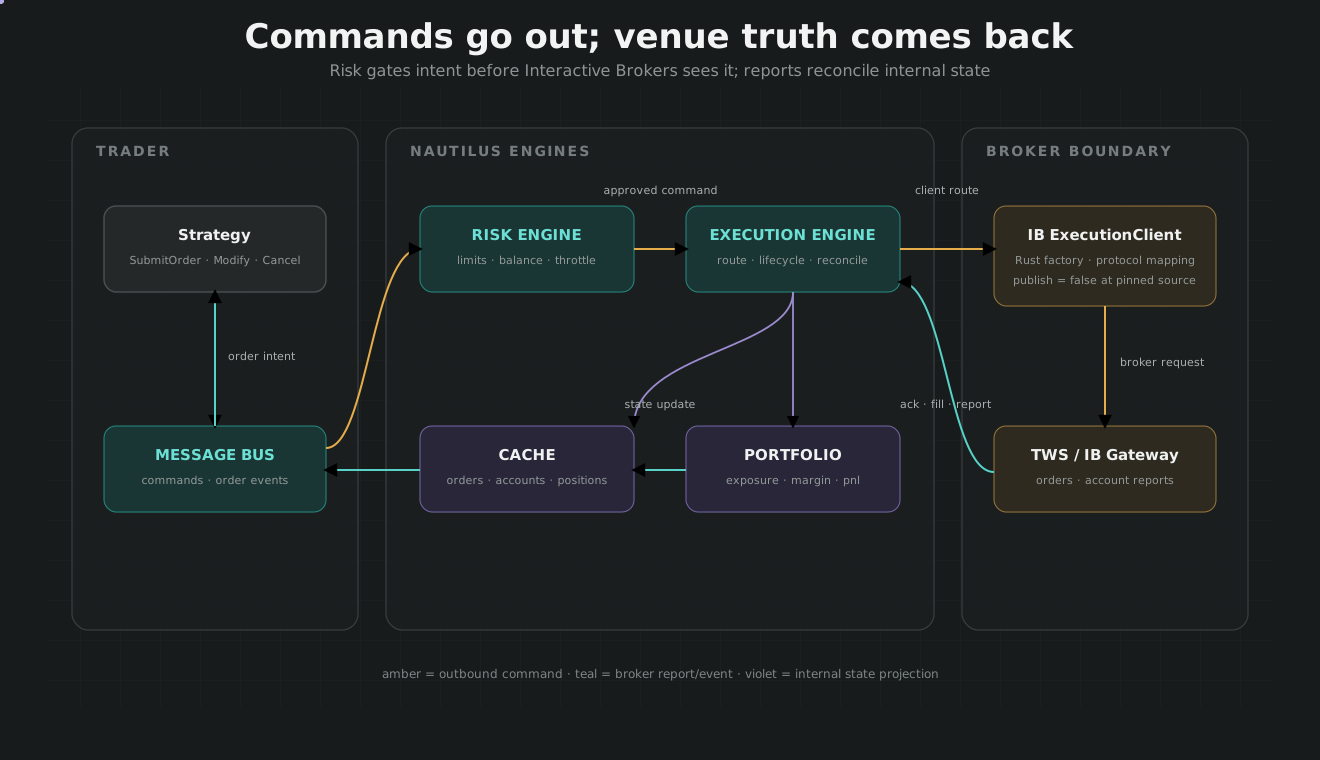
The frozen crate is intentionally publish = false. Consume it from the same pinned Nautilus repository revision as the other runtime crates.
Feature surface
| Feature | Effect |
|---|---|
execution |
Enables nautilus-execution and nautilus-network; enabled by default |
examples |
Enables nautilus-live/node and strategy example support |
gateway |
Enables Docker-based IB Gateway support through Bollard |
Source: crates/adapters/interactive_brokers/Cargo.toml.
Factory composition
The adapter exposes:
InteractiveBrokersDataClientFactoryInteractiveBrokersExecutionClientFactory- Data and execution configuration types
- Instrument-provider and symbology logic
- Live market-data and execution clients
LiveNodeBuilder invokes the factories during build. The data client is registered with DataEngine. The execution client is wrapped as LiveExecutionClient and registered with ExecutionEngine.
Source: crates/adapters/interactive_brokers/src/factories.rs.
Instrument resolution
IB uses contracts, conids, exchanges, currencies, security types, and provider-specific metadata to identify instruments. The adapter’s instrument provider resolves those definitions into Nautilus InstrumentAny values and canonical InstrumentId identifiers before market data or execution state is processed.
Instrument resolution must complete before execution reconciliation depends on those identifiers. The live-node startup sequence therefore connects and flushes data/instrument state before execution clients.
Market data
The data client manages IB subscriptions and converts provider events into Nautilus model types. Provider request identifiers and subscription state remain inside the adapter. Downstream strategies and services consume canonical quotes, trades, bars, and instruments rather than ibapi response types.
The native data example is:
cargo run --example ib-data-tester --package nautilus-interactive-brokers --features examples
Source: crates/adapters/interactive_brokers/examples/node_data_tester.rs.
Execution
The execution client handles submission, modification, cancellation, reports, and provider connectivity. Nautilus ExecutionEngine owns command routing and state transitions; the adapter translates between IB protocol messages and Nautilus reports.
Startup reconciliation, external-order discovery, in-flight checks, missing-order handling, and portfolio convergence are coordinated by the live execution engine. Do not create a second IB-specific order state machine outside this path.
The native execution example is:
cargo run --example ib-exec-tester --package nautilus-interactive-brokers --features examples
Source: crates/adapters/interactive_brokers/examples/node_exec_tester.rs.
Gateway and connection identity
IB permits multiple client connections distinguished by client ID. Account, host, port, and client identity must be configured deliberately, especially when TWS, Gateway, and other tools share a session. Live tests should use a paper account and a unique client ID.
The optional gateway feature can manage a containerized IB Gateway, but process supervision and authentication state remain deployment concerns. A running container is not proof that the brokerage session is authenticated or reconciled.
Operational evidence
Before enabling orders, prove:
- Gateway/TWS authentication survives the intended restart policy.
- Instrument lookup and market-data subscriptions succeed.
- Execution reconciliation matches the paper account.
- An order can be submitted, observed, and canceled through
ExecutionEngine. - Restart with an existing open order does not duplicate or lose state.
- Disconnect and reconnect produce bounded, observable behavior.