Rust edition: this page follows the live DeepWiki structure but treats the current Rust crates as implementation authority. Non-Rust surfaces are identified at their boundary and are not presented as Rust APIs.
Data Client and Adapter Framework
Relevant Rust source files
crates/common/src/clients/data.rscrates/common/src/factories/client.rscrates/data/src/client.rscrates/live/src/node/builder.rs
This page documents the DataClient and MarketDataClient base classes that define the interface for integrating external data sources into NautilusTrader. It covers client registration, venue routing, subscription patterns, request-response mechanisms, and adapter implementation guidelines.
Framework Architecture
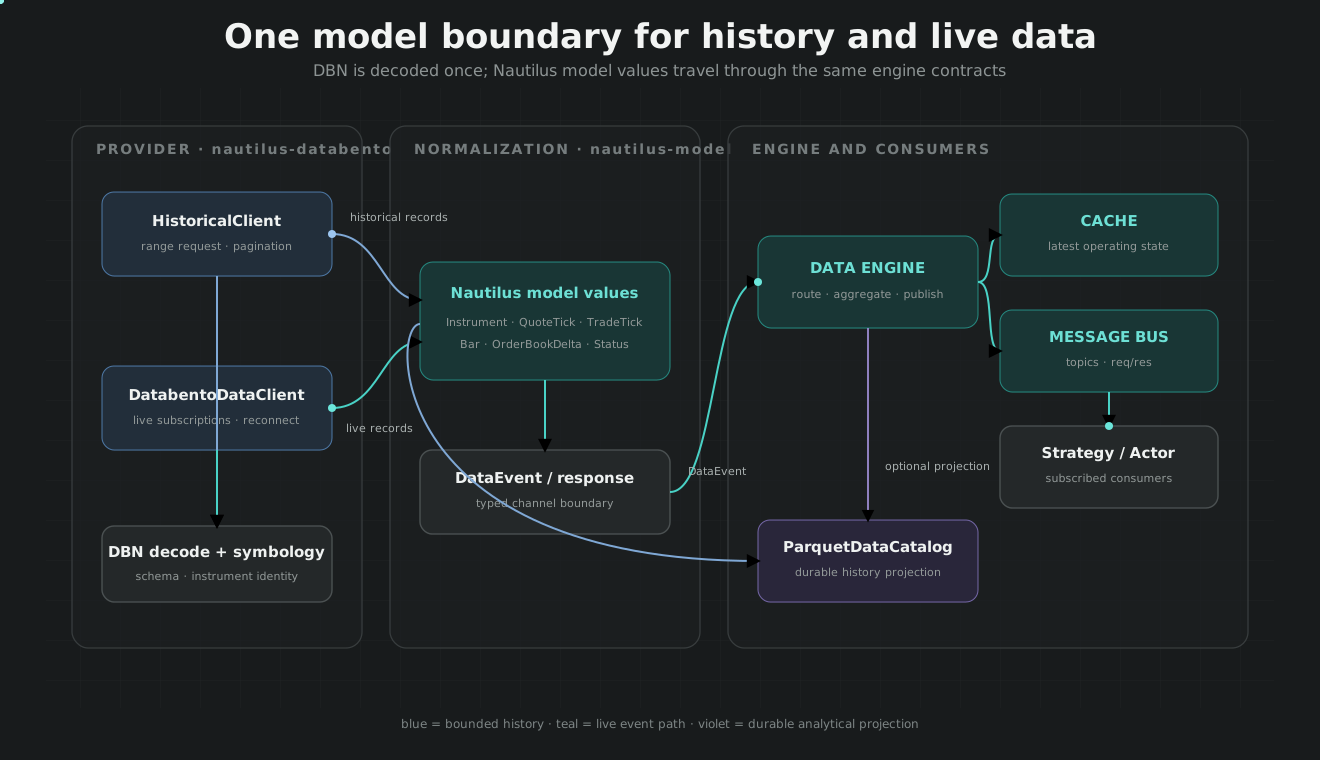
The data client framework implements a pluggable adapter architecture where external data sources are integrated through classes inheriting from DataClient or MarketDataClient. The DataEngine manages multiple client instances and routes commands based on venue associations.
The framework typically uses a layered architecture:
- Raw Clients (Rust): Low-level networking (HTTP/WebSocket) handling venue-specific protocols and authentication.
- Rust domain clients: Translate raw venue messages into Nautilus domain values such as
QuoteTickandBar. - Adapter Clients (legacy bindings): Implements the
DataClientorMarketDataClientinterface to interact with theDataEngine.
Client Type Hierarchy and DataEngine Integration
Client Type Hierarchy
DataEngine Integration
Sources:
DataClient Base Class
The DataClient class is the foundation for all data adapters, inheriting from Component and providing lifecycle management, connection state tracking, and response handling infrastructure.
DataClient Interface
Core Attributes and Methods
| Category | Member | Type | Description |
|---|---|---|---|
| Identity | id |
ClientId |
Unique client identifier used for routing. |
venue |
`Venue | None` | |
| State | is_connected |
bool |
Current connection status. |
| Lifecycle | _set_connected() |
void |
Updates connection state and logs transitions. |
| Data Ops | subscribe() |
void |
Subscribes to generic data types. |
unsubscribe() |
void |
Unsubscribes from generic data types. | |
| Response | _handle_data_response() |
void |
Forwards responses to the DataEngine. |
Sources:
MarketDataClient Specialization
MarketDataClient extends DataClient with specialized methods for subscribing to and requesting standard market data types (ticks, bars, order books).
Subscription Management
The client tracks active subscriptions to avoid redundant network calls and to facilitate re-subscriptions upon reconnection.
| Method | Command Type | Tracked Collection |
|---|---|---|
subscribe_instruments() |
SubscribeInstruments |
_subscribed_instruments_all |
subscribe_instrument() |
SubscribeInstrument |
_subscribed_instruments |
subscribe_quote_ticks() |
SubscribeQuoteTicks |
_subscribed_quote_ticks |
subscribe_trade_ticks() |
SubscribeTradeTicks |
_subscribed_trade_ticks |
subscribe_order_book() |
SubscribeOrderBook |
_subscribed_order_book_deltas |
subscribe_bars() |
SubscribeBars |
_subscribed_bars |
Sources:
DataEngine Integration and Routing
The DataEngine acts as a central hub, orchestrating multiple clients. It routes DataCommand messages to the appropriate client based on the Venue or ClientId specified in the command.
Registration and Mapping
register_client: Adds a client to the engine. If the client has an associatedVenue, it is added to the_routing_map.register_venue_routing: Explicitly maps aVenueto a specificClientId._default_client: Used when a command has no explicit routing information.
Sources:
Live vs. Backtest Data Clients
LiveDataClient
The LiveDataClient is the base for all real-time adapters. It integrates with the asyncio event loop and provides utilities for managing asynchronous tasks and timed callbacks.
create_task: Wrapsasyncio.create_taskwith standard error handling and logging.run_after_delay: Schedules a coroutine to run after a specified interval.
BacktestMarketDataClient
Used during historical simulations. Unlike live clients, it does not connect to external APIs. Instead, it receives data from the BacktestEngine and publishes it to the MessageBus if there are active subscriptions.
Sources:
Bar Aggregation System
The framework includes a robust aggregation system for building bars from ticks or smaller bars. This is integrated into the DataEngine via BarAggregator instances.
Aggregator Types
Nautilus provides Rust implementations for high-performance aggregation.
TimeBarAggregator: Aggregates bars based on time intervals (e.g., 1-minute, 1-hour).TickBarAggregator: Aggregates bars based on a fixed number of ticks.VolumeBarAggregator: Aggregates bars based on traded volume.ValueBarAggregator: Aggregates bars based on traded notional value.
BarBuilder
The BarBuilder is the core utility used by aggregators to maintain OHLCV state during the aggregation process. It handles price adjustments for continuous futures and maintains volume/count state.
| Function | Responsibility |
|---|---|
update |
Updates OHLCV and volume with a new price and size. |
update_bar |
Merges an existing bar into the current builder state. |
set_adjustment |
Configures price adjustment (e.g., BACKWARD_SPREAD). |
Sources:
Implementing a Venue Adapter
To implement a new venue-specific data adapter, the developer typically uses the _template adapter as a starting point.
Implementation Steps
- Define Configuration: Inherit from
NautilusConfigor adapter-specific config to define parameters like API keys and endpoints. - Inherit from
LiveDataClient: Implement abstract methods for connection and data requests. - Handle Subscriptions: Override methods like
subscribe_quote_ticksto send the appropriate messages to the venue's API. - Publish Data: When data is received from the venue, parse it into Nautilus models and publish to the
MessageBususing the correct topic format (e.g.,data.quotes.{instrument_id}). - Manage Lifecycle: Ensure
_connectand_disconnectproperly handle network resources and updateis_connectedstate via_set_connected.
Sources: