Rust edition: this page follows the live DeepWiki structure but treats the current Rust crates as implementation authority. Non-Rust surfaces are identified at their boundary and are not presented as Rust APIs.
Trading Components
Relevant Rust source files
crates/trading/src/strategy/mod.rscrates/trading/src/strategy/core.rscrates/system/src/trader.rs
This page documents the core trading components that strategies interact with when implementing algorithmic trading logic. This includes the Strategy base class, order types and lifecycle, position management, portfolio accounting, instrument metadata, and technical indicators. These components form the primary interface between user-written strategy code and the NautilusTrader execution system.
Scope: This page covers the trading-level abstractions used by strategy implementations. For lower-level execution engine internals, see Execution System. For data ingestion and processing, see Data System. For backtest-specific venue simulation, see Backtesting System.
Strategy Architecture
The Strategy class is the primary entry point for trading logic. In the Rust core, this is defined by the Strategy trait ( ) and supported by StrategyCore ( ). It extends the DataActor capabilities with specialized order and position management.
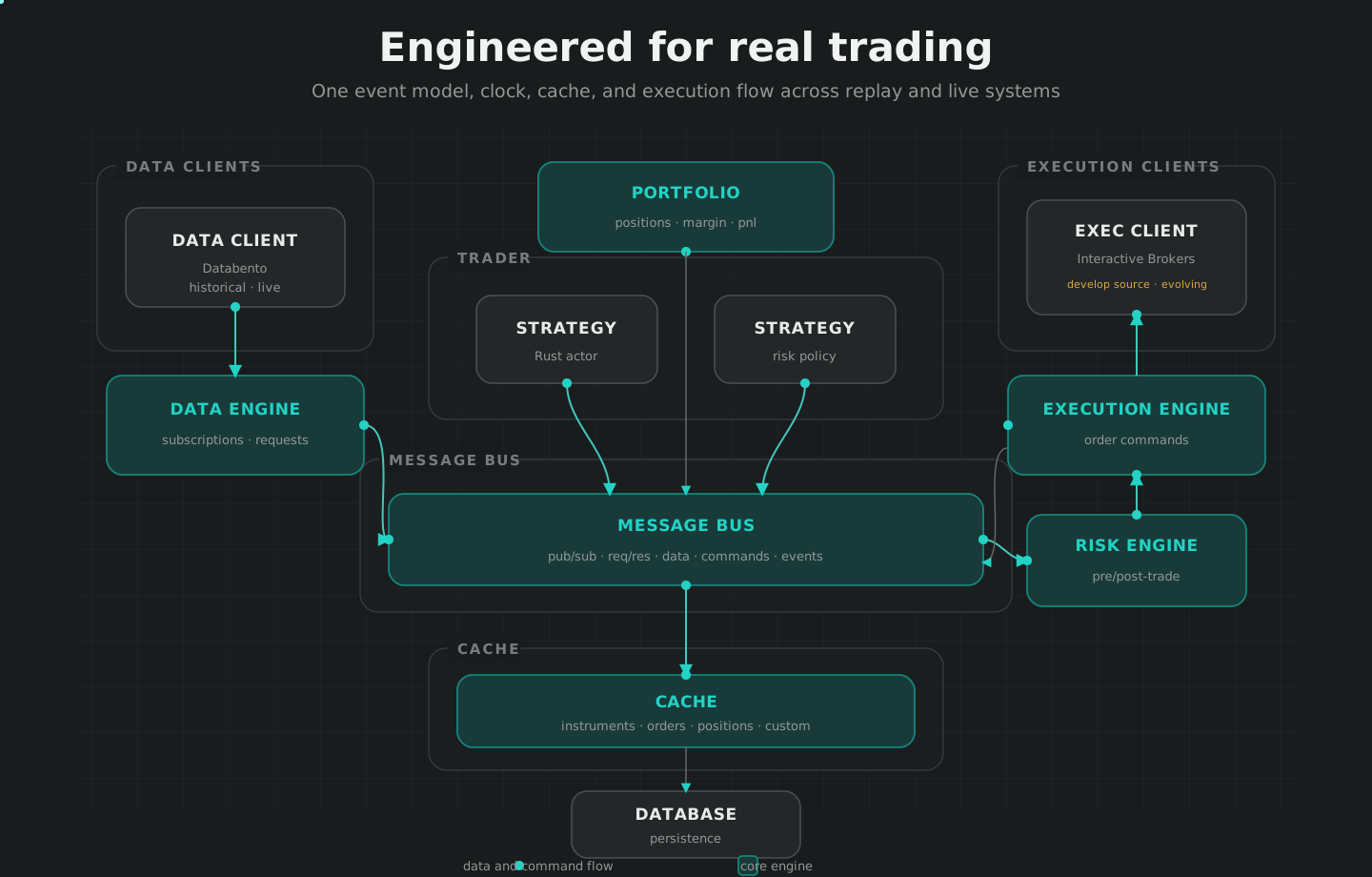
Code Entity Mapping: Strategy to Execution
The following diagram maps high-level strategy concepts to their corresponding code entities and file locations.
Sources:
Strategy Configuration and Registration
Strategies are configured via StrategyConfig ( ) and registered with a Trader instance ( ). During registration, the strategy receives references to core system components:
| Component | Type | Purpose |
|---|---|---|
trader_id |
TraderId |
Unique identifier for the trader instance ( ) |
portfolio |
Portfolio |
Access to positions and PnL ( ) |
cache |
Cache |
Access to historical state and orders ( ) |
clock_factory |
ClockFactory |
Source for high-precision time ( ) |
Sources:
Order Management System (OMS) Types
The strategy's oms_type determines how positions are handled.
NETTING: There will only be a single position for the strategy per instrument. The position ID naming convention is{instrument_id}-{strategy_id}( ).HEDGING: A position ID will be assigned for each new position which is opened per instrument ( ).UNSPECIFIED: Defaults to the native OMS type for each venue ( ).
For details, see Position and Portfolio Management.
Sources:
Order Types and Lifecycle
NautilusTrader supports various order types (Market, Limit, Stop, Trailing) with a comprehensive state machine. Strategies initiate orders using the submit_order command ( ) or submit_order_list for contingent orders.
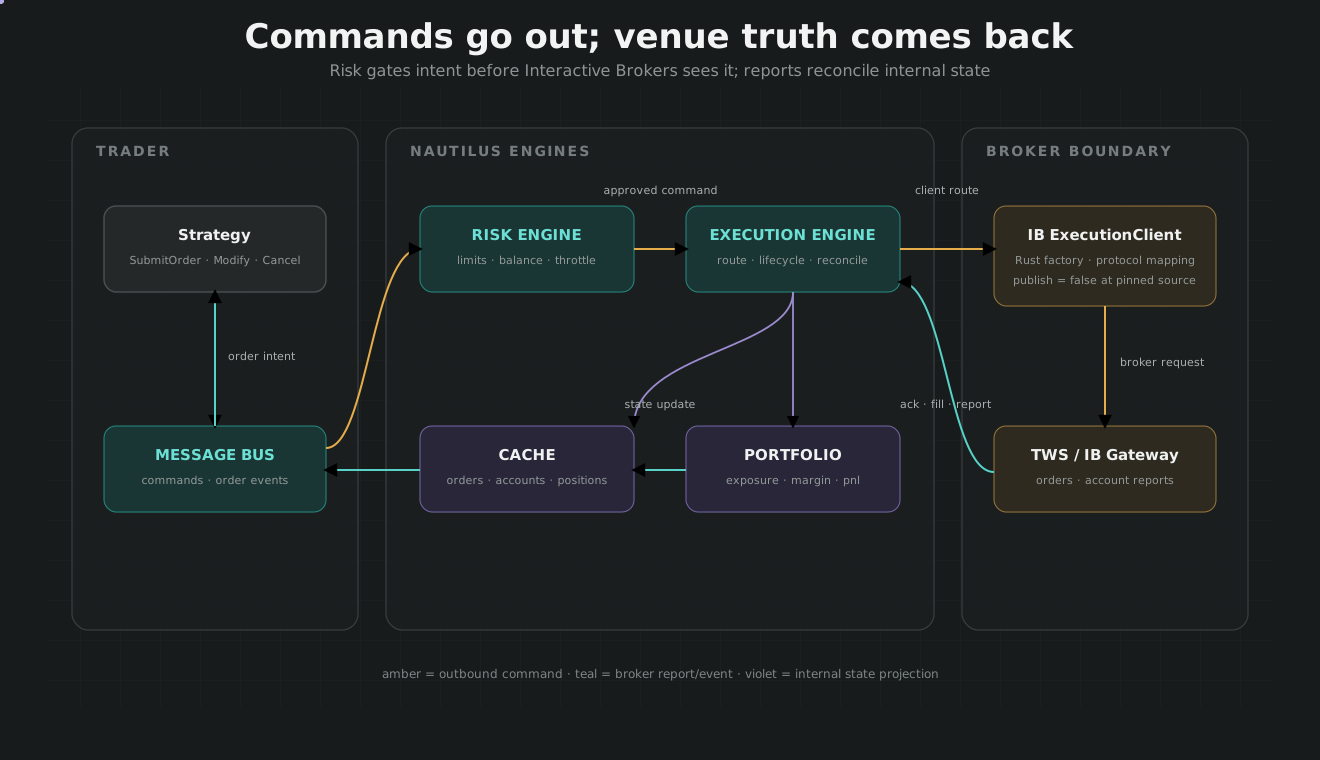
Order Lifecycle Mapping
This diagram bridges conceptual lifecycle phases to specific OrderEvent classes and the OrderStatus state machine transitions.
Sources:
Position and Portfolio Management
The Portfolio tracks global state across all strategies ( ).
Position: Tracks quantity, side, and PnL ( ).OrderManager: Orchestrates order state transitions and manages active local orders ( ).OrderFactory: Centralizes the creation ofOrderobjects ( ).
For details, see Position and Portfolio Management.
Sources:
Account Management
Accounts track balances, margin, and leverage. The system supports multiple account types:
CashAccount: For unleveraged spot trading.MarginAccount: For leveraged trading (Futures/Perpetuals); manages isolated and cross-margin ( ).BettingAccount: Specifically for betting exchanges like Betfair.
For details, see Account Management.
Sources:
Instruments and Market Metadata
Instruments define the specifications for tradable assets. NautilusTrader uses high-precision value objects to avoid floating-point errors.
Price: Fixed-point price representation ( ).Quantity: Fixed-point quantity representation ( ).InstrumentAny: Enum wrapping all instrument types (Equity, Futures, Crypto, etc.) ( ).
For details, see Instruments and Market Metadata.
Sources:
Technical Indicators
NautilusTrader includes a library of technical indicators (e.g., ExponentialMovingAverage) that can be registered within a strategy ( ).
For details, see Technical Indicators and Options Analytics.
Complete Trading Flow Example
The following sequence illustrates the interaction between components during a standard order submission.
An order fill returns from the venue through ExecutionEngine, updates cache and portfolio state, and reaches the originating strategy as a typed event.
Sources: