Rust edition: this page follows the live DeepWiki structure but treats the current Rust crates as implementation authority. Non-Rust surfaces are identified at their boundary and are not presented as Rust APIs.
Strategy Implementation
Relevant Rust source files
crates/trading/src/strategy/mod.rscrates/trading/src/strategy/core.rscrates/trading/src/strategy/config.rscrates/system/src/trader.rs
Purpose and Scope
This page documents the Strategy base class and how to implement trading strategies in NautilusTrader. It covers the strategy lifecycle, event handling methods, order management commands, and integration with core platform components.
The Strategy class is a specialized Actor that provides a high-level API for order management, position tracking, and portfolio interaction. It is designed to be used within the Trader component, which orchestrates the strategy's interaction with the rest of the system.
Strategy Base Class
The Strategy class inherits from Actor and provides order management capabilities on top of the actor's data handling functionality. All trading strategies must inherit from this base class.
Diagram — Strategy Class Hierarchy
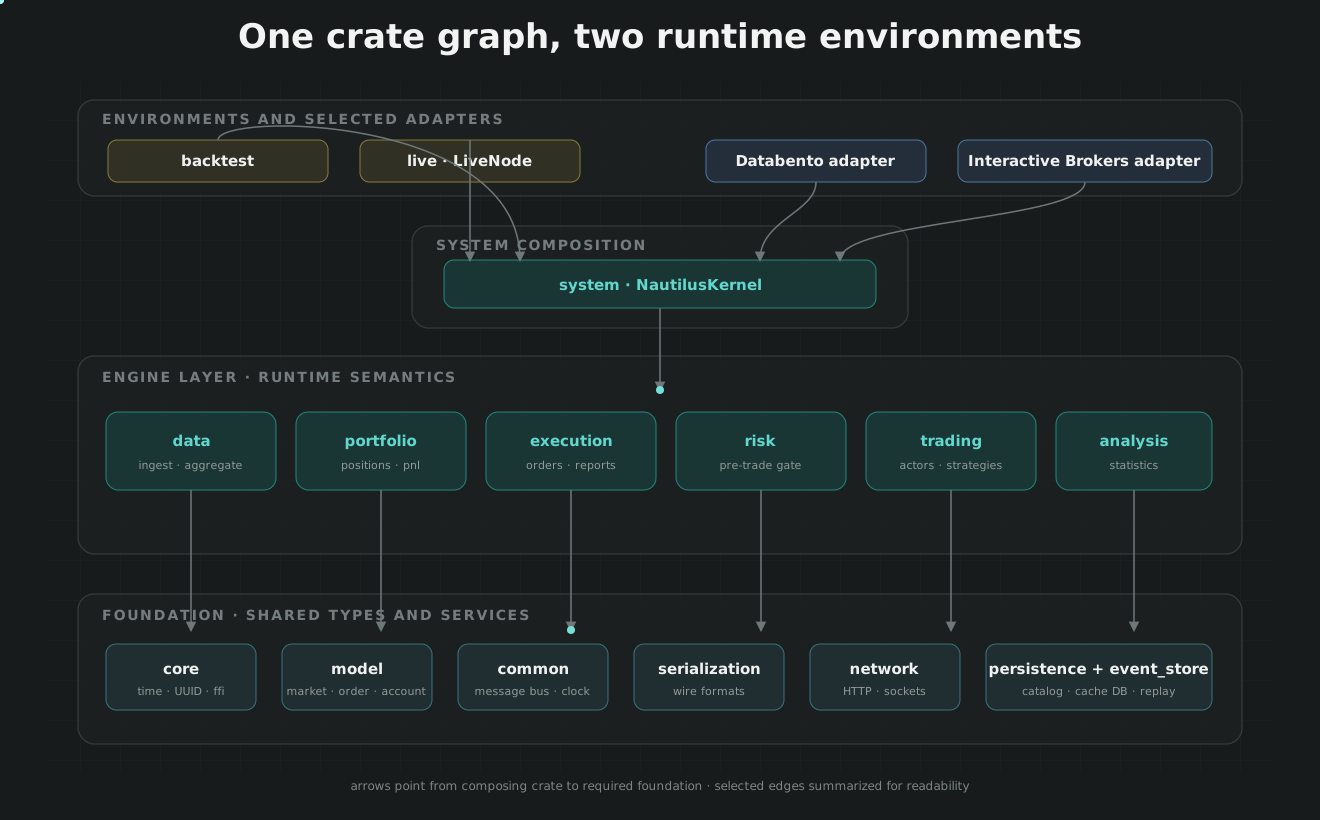
In the Rust crate graph, strategy behavior belongs to nautilus-trading; it consumes common actor/message facilities, model commands and events, execution order management, portfolio views, and cache access through narrow facades.
Key Strategy Attributes
| Attribute | Type | Description |
|---|---|---|
id |
StrategyId |
Unique identifier combining strategy name and order_id_tag. |
order_factory |
OrderFactory |
Factory for creating orders with correct IDs and tags. |
order_id_tag |
str |
Tag appended to order IDs for this strategy to ensure uniqueness. |
oms_type |
OmsType |
Order management system type (NETTING/HEDGING/UNSPECIFIED). |
portfolio |
PortfolioFacade |
Interface for querying account balances and positions. |
cache |
CacheFacade |
Interface for accessing historical and real-time state. |
external_order_claims |
list[InstrumentId] |
Instruments for which this strategy claims external orders. |
Strategy Configuration
Strategies are configured using StrategyConfig (or subclasses). Configuration determines the strategy's OMS behavior, order ID generation, and lifecycle management.
StrategyConfig Parameters
| Parameter | Type | Default | Description |
|---|---|---|---|
strategy_id |
`str | None` | None |
order_id_tag |
str |
None |
Tag for order ID generation. |
oms_type |
`OmsType | str` | UNSPECIFIED |
external_order_claims |
list[str] |
[] |
Instrument IDs to claim external orders. |
manage_contingent_orders |
bool |
False |
Auto-manage contingent orders (OTO/OCO). |
manage_stop |
bool |
False |
Execute market exit on strategy stop. |
use_uuid_client_order_ids |
bool |
False |
Use UUID4 for client order IDs. |
Strategy Lifecycle
Registration and Initialization
Strategies must be registered with a Trader instance. The registration process wires up dependencies and sets up the strategy's internal OrderManager.
Diagram — Strategy Registration Flow
Registration assigns the strategy identity and injects clock, message bus, cache and portfolio access. It then initializes order construction and management and registers the strategy's order and position event handlers before the lifecycle can enter READY.
Lifecycle State Machine
Strategies follow the standard component lifecycle managed by the NautilusKernel.
Diagram — Strategy Component Lifecycle
Strategy lifecycle follows the shared component state contract: registration reaches READY; start enters STARTING and invokes on_start before RUNNING; stop, resume, reset and dispose each pass through their transitional state before the corresponding user callback completes.
Start Sequence
The _start() internal method performs critical state restoration before calling user-defined on_start():
- OMS Verification: Logs the strategy's OMS type and any venue-specific overrides.
- ID Restoration: Queries the cache for existing
client_order_idandorder_list_idcounts to ensure ID continuity. - GTD Management: If
manage_gtd_expiryis enabled, it checks all open orders and cancels those that have expired while the strategy was inactive.
Order Management System (OMS) Types
The oms_type configuration determines how the ExecutionEngine assigns orders to positions for the strategy.
| OMS Type | Behavior | Position ID Format |
|---|---|---|
NETTING |
Single position per instrument. New orders adjust the existing position. | {instrument_id}-{strategy_id} |
HEDGING |
Multiple positions per instrument allowed (e.g., simultaneous Long and Short). | Generated UUID/Counter |
UNSPECIFIED |
Defaults to the native OMS type of the specific venue. | Venue-dependent |
Event Handlers
Strategies receive events through a hierarchical handler system. Events flow from specific handlers (e.g., on_order_filled) to generic handlers (e.g., on_order_event).
Order Event Handlers
| Handler | Event Type | Description |
|---|---|---|
on_order_initialized |
OrderInitialized |
Order created and cached locally. |
on_order_submitted |
OrderSubmitted |
Order sent to the execution client. |
on_order_accepted |
OrderAccepted |
Order acknowledged by the venue. |
on_order_rejected |
OrderRejected |
Order rejected by the venue. |
on_order_filled |
OrderFilled |
Order execution (partial or full). |
on_order_canceled |
OrderCanceled |
Order successfully canceled. |
on_order_triggered |
OrderTriggered |
Stop/Trigger order activated. |
Position Event Handlers
Strategies also receive position lifecycle events:
on_position_opened: Called when a new position is created.on_position_changed: Called when the quantity or side of a position changes.on_position_closed: Called when a position is fully flattened.
Trading Commands
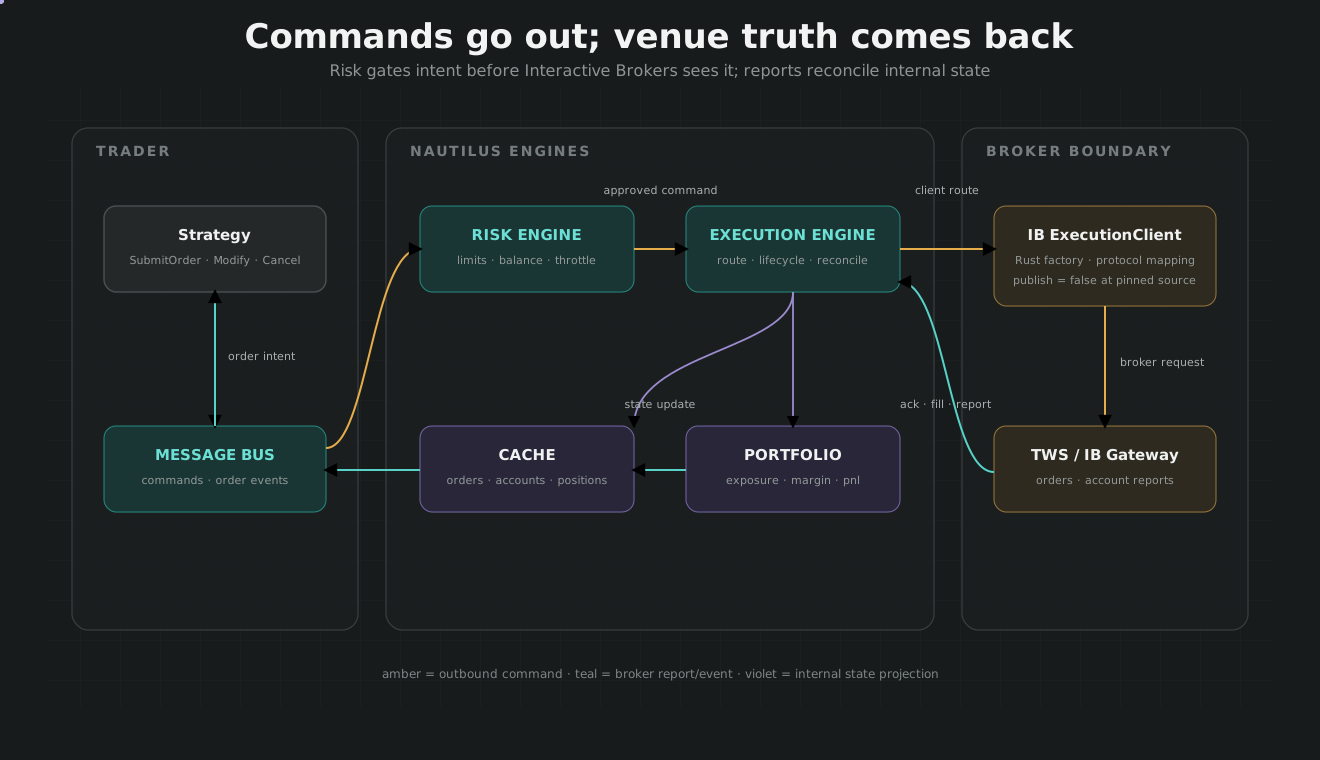
Strategies issue commands to the ExecutionEngine via high-level methods.
Diagram — Strategy Command Path
Key Commands
submit_order(order, ...): Validates the order status and routes it through the risk engine. Supportsemulation_triggerfor local stop orders andexec_algorithm_idfor algo execution.modify_order(client_order_id, ...): Sends a modification request for price or quantity.cancel_order(client_order_id, ...): Sends a cancellation request for an open order.close_position(position_id, ...): Helper to submit a market order to flatten a specific position.
Rust Strategy Implementation
NautilusTrader allows writing strategies in pure Rust for maximum performance. This is facilitated by the Strategy trait and the nautilus_strategy! macro.
StrategyCore
The StrategyCore struct provides the underlying state and functionality required by the Strategy trait, including the OrderManager, Cache, and Clock. It is held as a member within a user's custom strategy struct.
nautilus_strategy! Macro
This macro simplifies the implementation of the Strategy trait by generating boilerplate code for native runtime wiring.
nautilus_strategy!(MyStrategy, {
    fn on_order_rejected(&mut self, event: OrderRejected) {
        log::warn!("Order rejected: {}", event.reason);
    }
});
Example Strategies
EMA Cross Strategy
A simple strategy that enters long when a fast EMA crosses above a slow EMA, and enters short when it crosses below.
- Indicator Registration: Uses
register_indicator_for_barsto automatically update indicators as new bar data arrives. - Signal Logic: In
on_bar, it checks the relationship betweenfast_emaandslow_ema. - Execution: Submits
MarketOrderbased on the cross signal.
Volatility Market Maker
Brackets the top of the order book based on volatility measured by an Average True Range (ATR) indicator.
- Data Subscription: Subscribes to
QuoteTickandTradeTickfor real-time pricing. - Market Making: In
on_quote_tick, it calculates bid/ask levels relative to the mid-price using an ATR multiple. - Order Management: Uses
LimitOrderand manages existing orders by canceling/replacing them as the market moves.