Rust edition: this page follows the live DeepWiki structure but treats the current Rust crates as implementation authority. Non-Rust surfaces are identified at their boundary and are not presented as Rust APIs.
Backtesting Best Practices
Relevant Rust source files
crates/backtest/src/engine.rscrates/backtest/src/config.rscrates/testkit/src/lib.rscrates/analysis/src/analyzer.rs
This page provides guidelines and best practices for effective backtesting with NautilusTrader, covering data quality, fill modeling, latency simulation, and specialized tutorials for derivatives and high-frequency strategies. These practices help ensure reliable, reproducible, and efficient backtest execution.
For information about the core backtesting engine architecture, see BacktestEngine Core. For details on high-level API orchestration, see BacktestNode and High-Level API.
Data Quality and Ingestion
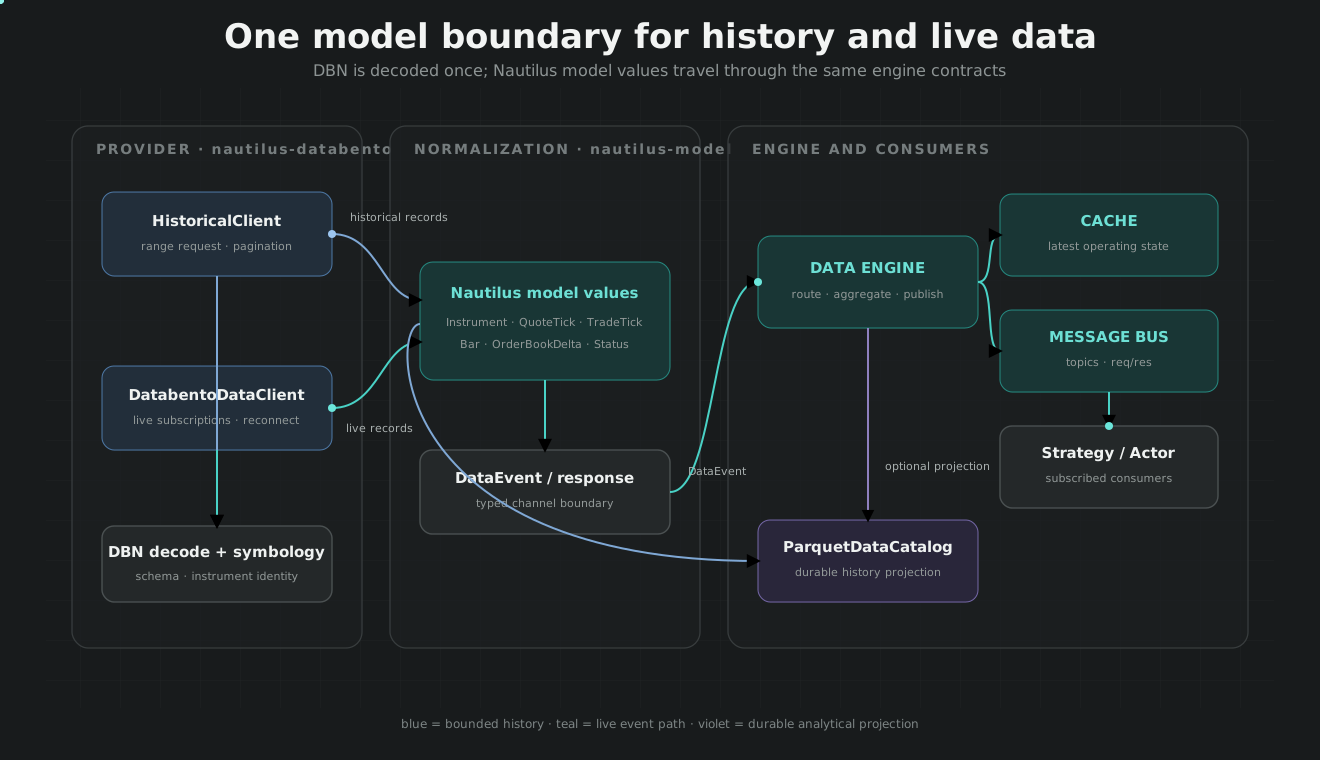
Reliable backtests start with high-quality data. NautilusTrader provides two primary paths for data ingestion: the high-level BacktestNode which utilizes a ParquetDataCatalog, and the low-level BacktestEngine which can accept in-memory data or direct streams.
Data Monotonicity and Sorting
The BacktestEngine enforces strict invariants to ensure data integrity. All data must be sorted by initialization timestamp (ts_init) before processing.
- Monotonicity: The engine requires data to be strictly monotonic. If your data is unsorted, use the
sortflag inadd_dataor callsort_data()explicitly - Efficient Batching: For large datasets, defer sorting until all data is added by calling
engine.add_data(data, sort=false)followed by a singleengine.sort_data()call - Streaming: For datasets exceeding RAM, use the
BacktestNodewith achunk_sizeconfiguration to pull data lazily from the catalog
Data Flow Diagram
The following diagram illustrates the flow from raw data sources to the engine using the BacktestNode orchestration.
Diagram — Backtest Data Ingestion Pipeline
Realistic Venue Simulation
The BacktestEngine allows for granular configuration of simulated venues to match live exchange characteristics via BacktestVenueConfig or SimulatedVenueConfig
Fill and Latency Modeling
The platform provides several models to simulate execution reality:
- Fill Models: Includes
DefaultFillModel,SizeAwareFillModel(accounts for volume at price), andTwoTierFillModel - Latency Models: Simulates network and exchange matching delays using
ConstantLatencyModelor more complex distributions - Liquidity Consumption: If enabled, fills consume available liquidity at price levels, which only resets when fresh market data arrives
Venue Configuration Checklist
- OMS Type: Use
OmsType::Nettingfor netting accounts (e.g., Binance Futures) andOmsType::Hedgingfor hedging accounts (e.g., FX) - Account Type: Match the account logic (e.g.,
AccountType::Cash,AccountType::Margin, orAccountType::Betting) - Fee Models: Configure
FeeModelto account for maker/taker rebates and commissions
Specialized Backtesting Tutorials
NautilusTrader includes several advanced tutorials demonstrating best practices for specific asset classes and strategy types.
Derivatives and Options
For options strategies, the platform handles venue-provided Greeks or manages them via a local GreeksCalculator
- Delta-neutral options: Exercise Greek updates, hedge timing, transaction costs, and expiry behavior with deterministic fixtures.
- Option Chain Replay: Use
NautilusDataType::OptionGreeksandOptionBookdata to simulate complex volatility strategies
High-Frequency and Market Making
- Grid market making: Exercise geometric pricing, inventory skew, queue assumptions, and short-lived orders.
- Order-book imbalance: Use Databento depth fixtures to test ordering, snapshot/delta recovery, and signal stability.
- Composite market making: Combine durable Databento history with an explicitly modeled execution venue.
Regime-Based and Directional Strategies
- Hurst/VPIN: Test regime filters and informed-flow metrics across disjoint historical periods.
- FX Bars: Demonstrates EMA crossover strategies on FX bars including rollover interest simulation
Execution System Interaction
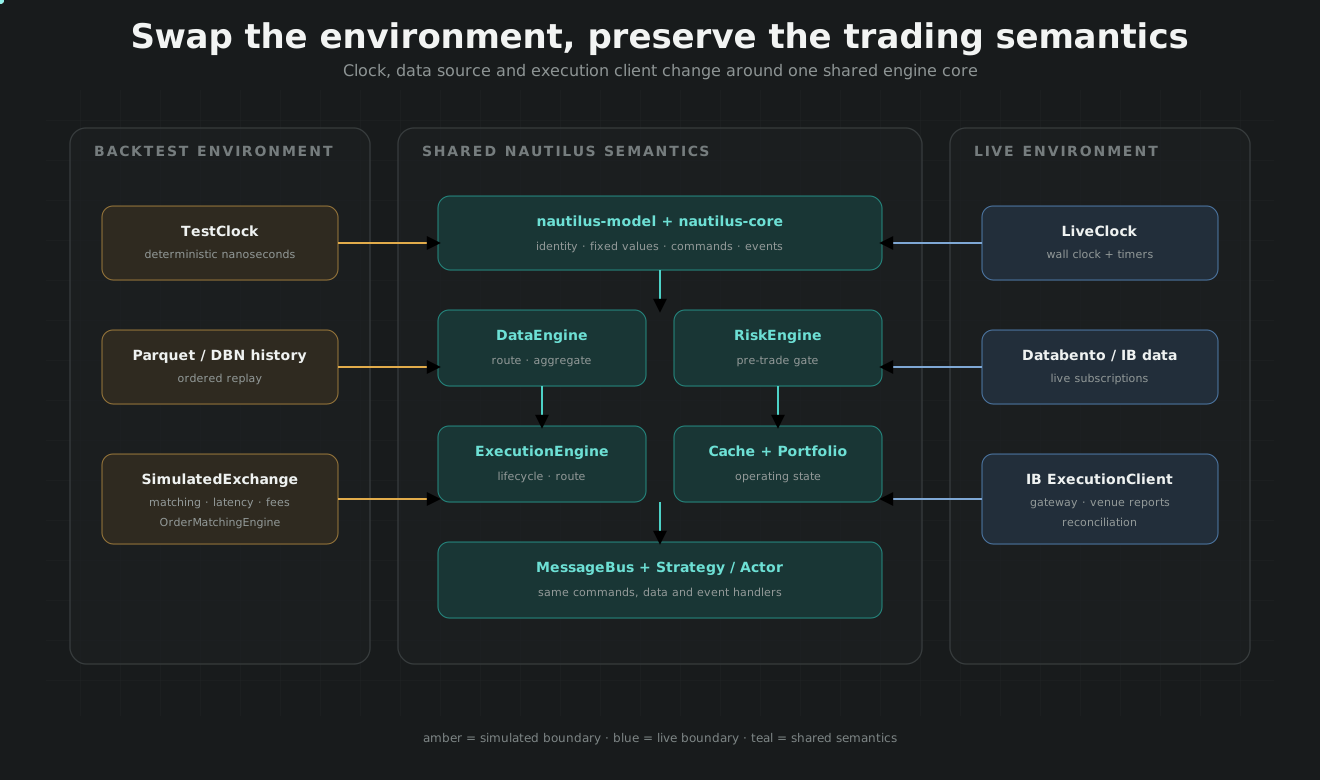
The interaction between the strategy and the matching engine is mediated by the MessageBus, ensuring that backtest logic follows the same event-driven path as live trading.
Diagram — Strategy and Matching Engine Interaction
Overfitting Prevention and Interpretation
Result Analysis
After running a backtest, the BacktestResult (or PortfolioAnalyzer in the high-level API) provides comprehensive metrics
- Tearsheets: Generate Plotly-based HTML tearsheets to visualize equity curves, drawdowns, and trade distributions
- Resource Management: Sequential execution of backtests in the same process is supported, but users must ensure proper disposal between runs to clear global state
Best Practices for Strategy Robustness
- Requote Thresholds: In market making, use
requote_threshold_bpsto avoid excessive churn and transaction costs - Inventory Skewing: Implement skew factors to manage exposure and prevent large directional bets in market-neutral strategies
- Multiple environments: Validate against distinct Databento datasets and, when execution behavior matters, a bounded Interactive Brokers paper workflow so logic is not fitted to one feed or simulator artifact.