Rust edition: this page follows the live DeepWiki structure but treats the current Rust crates as implementation authority. Non-Rust surfaces are identified at their boundary and are not presented as Rust APIs.
Backtest Data Management
Relevant Rust source files
crates/persistence/src/backend/catalog.rs
This page documents how data is loaded, configured, and managed within the backtesting system. It covers data configuration via BacktestDataConfig, catalog integration through ParquetDataCatalog, loading modes (one-shot vs streaming), the StreamingFeatherWriter for result capture, and data wrangling utilities.
Data Configuration
Data loading is configured through BacktestDataConfig, which specifies what data to load, from where, and with what filters. Each BacktestRunConfig contains a list of BacktestDataConfig objects.
BacktestDataConfig Structure
| Parameter | Type | Description |
|---|---|---|
catalog_path |
str |
Path to the ParquetDataCatalog |
data_cls |
`type | str` |
instrument_id |
`InstrumentId | str` |
instrument_ids |
`list[InstrumentId | str]` |
bar_types |
`list[BarType | str]` |
start_time |
`str | int` |
end_time |
`str | int` |
filter_expr |
str |
PyArrow filter expression string |
The BacktestNode uses these configurations to orchestrate the data loading process before or during a backtest run.
Data Catalog Integration
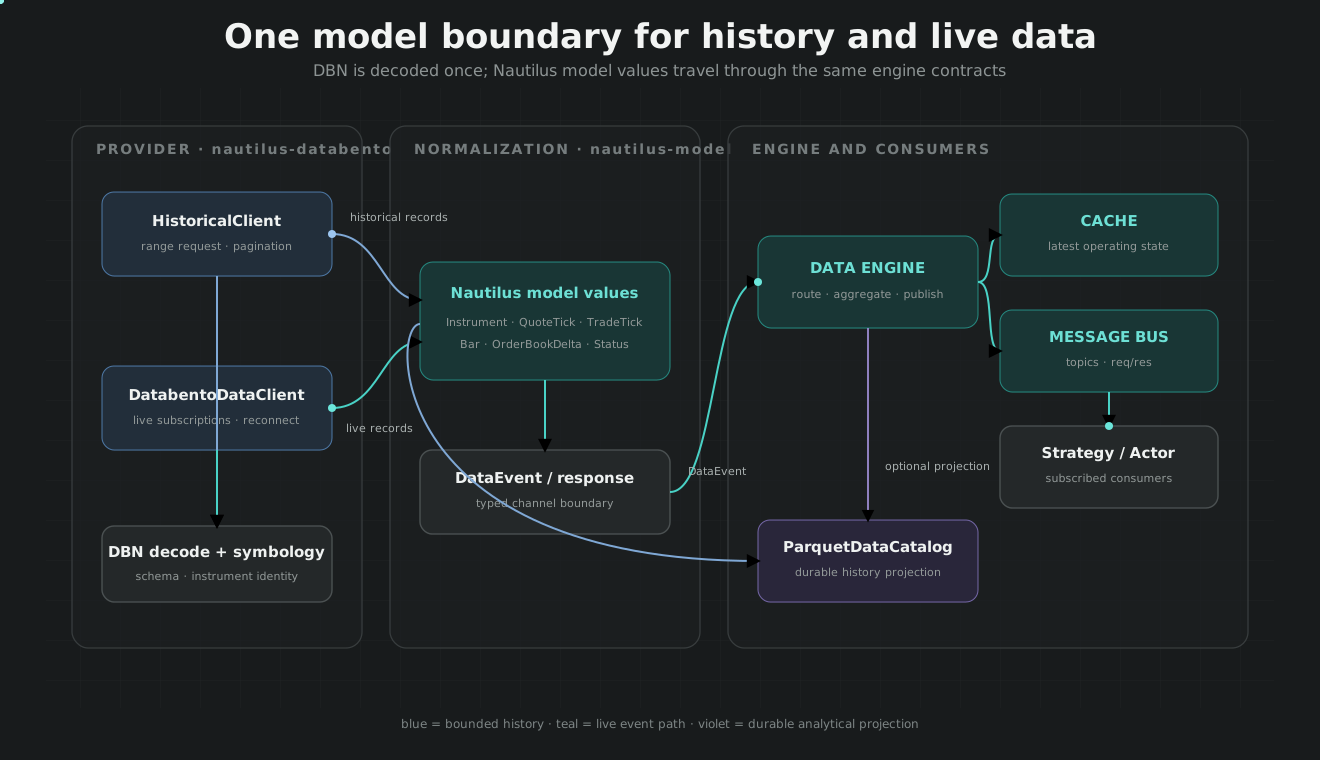
The ParquetDataCatalog serves as the primary data backend, storing historical market data in columnar Parquet format using Apache Arrow. It supports multiple storage backends through the object_store crate in Rust
Catalog Loading in BacktestNode
Catalog Organization
Data is organized hierarchically on the filesystem :
data/{data_type}/{instrument_id}/{start_ts}-{end_ts}.parquet- The
class_to_filenameutility converts class names to filesystem-safe paths. - Filenames are generated based on the timestamp ranges they contain
Catalog Operations
The catalog supports maintenance operations such as:
- Consolidation: Merging multiple small files into larger ones to optimize query performance
- Validation: Ensuring data integrity with timestamp ordering and interval validation
- Deduplication: Removing duplicate records during consolidation
Loading Modes
NautilusTrader supports two data loading modes: one-shot (full-load) and streaming.
One-Shot Loading
In one-shot mode (chunk_size=None), all data is loaded into memory before the backtest starts
- Query Catalog:
BacktestNodeloads all data into a list viacatalog.query() - Add to Engine: Data is added via
engine.add_data(data, sort=False) - Sort Once:
engine.sort_data()is called once after all data is loaded to ensure monotonic order
Streaming Mode
In streaming mode (chunk_size > 0), data is loaded and processed in chunks using a DataBackendSession
- Create Session: A
DataBackendSessionis initialized with thechunk_size - Stream Chunks:
session.to_query_result()yields data capsules containing batches of data - Iterative Execution: For each chunk, the engine runs via
engine.run(streaming=True), processes the data, and then clears its internal data buffer viaengine.clear_data()
Streaming Result Capture
During a backtest, results (orders, fills, account states) can be streamed directly to disk using the StreamingFeatherWriter.
StreamingFeatherWriter
The StreamingFeatherWriter persists Nautilus objects into feather files with rotation capabilities.
- Rotation Modes: Supports rotation by
SIZE,INTERVAL,SCHEDULED_DATES, orNO_ROTATION - Implementation: It uses an internal
ArrowSerializerto convert Nautilus objects to Arrow RecordBatches. - Per-Instrument Writers: Automatically handles separate files for instrument-specific data like
bar,quote_tick, andtrade_tick
Data Wrangling and Utilities
Nautilus provides utilities for cleaning, standardizing, and converting external data into internal models.
Data Wranglers (V2)
The V2 wranglers provide high-performance conversion from Arrow tables or Pandas DataFrames to Nautilus objects using the Rust-based serialization layer.
QuoteTickDataWranglerV2: Converts raw quote data intoQuoteTickobjectsTradeTickDataWranglerV2: Converts raw trade data intoTradeTickobjects
Monotonicity Enforcement
The ParquetDataCatalog includes internal utilities to ensure data integrity during loading:
_enforce_monotonic_ts: Validates that timestamps (ts_init) are strictly increasing, sorting the underlying Arrow table if necessary- Rust Validation: The Rust backend uses
is_monotonically_increasing_by_initto verify data before writing
Data Flow Diagram